Best Ergonomic Keyboards and Mice (2026)
Affiliate disclosure: As an Amazon Associate I earn from qualifying purchases. MedHelperPro may earn a commission from eligible purchases made through links in this guide, at no extra cost to you. Affiliate availability does not affect our selections. Read the full disclosure.
Research note: Product selections are based on published specifications, policies, and independent evidence unless a guide explicitly describes hands-on testing.
Start with fit and layout, not the product with the most dramatic shape.
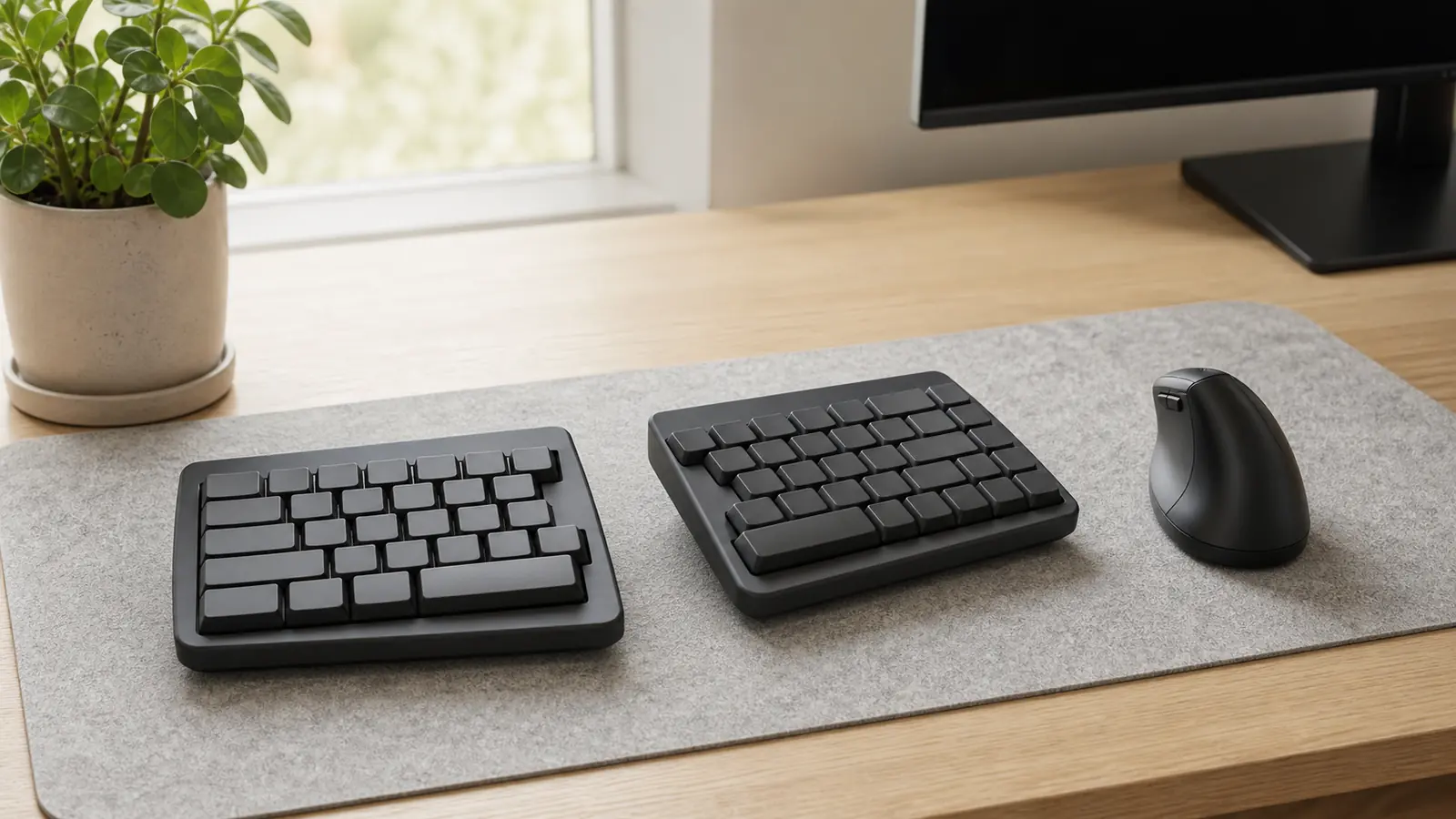
Logitech Wave Keys is the best keyboard for most office users because its compact curved layout asks for the smallest change in typing technique. Kinesis Freestyle2 offers the most useful separation adjustment. ERGO K860 suits full-size keyboard users. Pair Lift with small or medium hands, or MX Vertical with medium or large hands.
+ LIFT
An ergonomic keyboard or mouse is worthwhile only if it lets you work with less reaching and fewer awkward wrist angles. OSHA's keyboard guidance says alternative designs may support a more neutral wrist posture, but research does not conclusively show that they prevent discomfort or injury. That is the right level of confidence for this category.
Fix the desk first. A shaped keyboard placed too high or a vertical mouse parked beyond a wide number pad can still make you reach. The ergonomic workspace buying order explains how chair height, desk height, and screen position affect input-device placement. If the board needs separate palm support, match it with the wrist rest height guide instead of choosing foam or gel by feel alone.
Which ergonomic keyboard or mouse should you buy?
| Product | Design and fit | Connection | Main tradeoff | Best for |
|---|---|---|---|---|
| Logitech Wave KeysCheck price on Amazon | Compact curved full-size keyboard with fixed palm rest | Bluetooth or Logi Bolt; three devices | Fixed curve, no backlight, cramped for some typists | Most office users and first ergonomic keyboard |
| Logitech ERGO K860Check price on Amazon | Large curved split keyboard with number pad | Bluetooth or Logi Bolt; three devices | Wide and fixed; takes more desk space | Spreadsheet work and full-size keyboard habits |
| Kinesis Freestyle2Check price on Amazon | Two-piece split keyboard with adjustable separation | Wired USB-A; separate Bluetooth and Mac models | Tenting and palm supports cost extra | Shoulder-width adjustment and low wireless risk |
| Logitech LiftCheck price on Amazon | 57-degree vertical mouse for small or medium hands; left option | Bluetooth or Logi Bolt; three devices | Too small for some hands; not a gaming mouse | Most office users choosing a first vertical mouse |
| Logitech MX VerticalCheck price on Amazon | 57-degree right-handed mouse for medium or large hands | Bluetooth, Unifying receiver, or USB-C cable | Right-handed only and less responsive for fast gaming | Larger hands and rechargeable power |
Direct prices checked July 31, 2026: Logitech listed Wave Keys at $59.99 during a temporary sale, with $69.99 shown as the regular price; Lift at $79.99; ERGO K860 at $129.99 during a temporary sale, with $149.99 shown as regular; and MX Vertical at $99.99 during a temporary sale, with $119.99 shown as regular. Kinesis listed the wired Freestyle2 for PC from $99. Prices, promotions, and configurations can change.
How were these keyboards and mice selected?
The shortlist favors clear dimensions, connectivity, fit guidance, and usable return terms. Maker posture claims did not count as proof of pain relief, and customer ratings were not converted into a score.
- Positioning range: A keyboard should let the elbows stay close and wrists stay reasonably straight. A mouse should sit next to the keyboard, not beyond an unnecessary reach.
- Adjustment: Separate halves offer more control than a fixed curve, but they also increase setup work and adaptation.
- Hand and desk fit: Mouse size, keyboard width, palm-rest depth, cable path, and available desk depth matter before software features.
- Work performance: Ordinary office latency, device switching, operating-system support, and battery or cable needs were checked. Gaming performance was treated separately.
- Ownership: Return windows, model variants, warranties, replaceable batteries, and optional accessories affect the real cost of trying a new shape.
OSHA recommends keeping the pointer close, choosing a shape that fits the hand, and trying a new device before long-term use. Its guidance also notes that a keyboard without a number pad can leave more room for the mouse. Those practical points carried more weight here than design labels such as "advanced ergonomic."
Why is Logitech Wave Keys the best keyboard for most people?
Wave Keys changes the wrist and finger path without forcing a new key map. The board has a gently curved, slightly tented layout, an integrated cushioned palm rest, a number pad, and a 14.8-inch width. The current Logitech data sheet lists Bluetooth 5.1, Logi Bolt, three-device switching, two AAA batteries with up to three years of claimed life, and a two-year warranty for the business model.
That compact width is the main buying argument. It puts the mouse closer than many full-size keyboards while keeping a number pad. The layout is still fixed, so users with broad shoulders cannot spread the halves. The palm rest cannot be removed, and the board has no backlight.
RTINGS' current test report found the keyboard extremely quiet and good for office use, but described the rubber-dome feel as somewhat mushy and the layout as cramped. It also found wireless performance suitable for office work and casual games, not competitive gaming. Best for: a low-friction first move away from a flat keyboard. Skip it if: you want independent half placement, mechanical switches, backlighting, or a removable rest.
Who should choose Logitech ERGO K860?
ERGO K860 suits people who want a more pronounced split curve without abandoning familiar full-size keys. Logitech lists a 17.95-inch width, a number pad, a fixed curved split key frame, a three-layer palm rest, and front feet that create 0, minus 4, or minus 7 degrees of palm lift. Its business data sheet specifies Bluetooth or Logi Bolt, three-device switching, two AAA batteries with up to 24 months of claimed life, and a two-year limited hardware warranty.
The wide frame is both its advantage and its problem. Spreadsheet users keep a built-in number pad, while mouse-heavy users may have to reach farther right. The split angle and tent are fixed, so the board either suits the user's shoulder width or it does not.
RTINGS found strong office typing quality after adjustment, but warned that the unusual layout takes time and that latency is not meant for gaming. Best for: quiet office typing, frequent number entry, and people who prefer laptop-style scissor keys. Skip it if: the desk is narrow, the mouse already feels too far away, or separate halves are the reason for switching.
When is Kinesis Freestyle2 the better split keyboard?
Freestyle2 is the most adjustable keyboard in this shortlist because its halves can rotate and separate instead of locking the user into one curve. The wired PC version keeps a familiar tenkeyless layout, uses a zero-degree base slope, and comes with either a 9-inch or 20-inch linking cable. Kinesis publishes a 15.375-inch minimum width, up to 23.5 inches with the standard cable, USB-A connectivity, a 44-gram operating force, a two-year warranty, and a 60-day direct trial.
The base board is flat. Reproducible 5, 10, or 15-degree tenting needs the optional V3 or VIP3 kit. Palm supports are also optional, and Kinesis says the adhesive pads may need replacement after roughly 6 to 12 months. Those parts raise the effective price and increase desk depth.
The wired connection avoids batteries and ordinary wireless delay, but it is less convenient for a clean standing-desk cable path. Mac and Bluetooth models are separate purchases. TechGearLab's independent review praised the familiar layout and adaptable split while noting that the product makes the most sense for users who want adjustment without moving to a columnar key map. Best for: shoulder-width control and buyers willing to tune the setup. Skip it if: you want one compact wireless board or expect tenting and palm supports in the base package.
Is Logitech Lift the best vertical mouse for most users?
Lift is the safer starting point for small and medium hands. Logitech gives it a 57-degree vertical angle, right- and left-handed versions, a 4.25-inch length, four customizable buttons, Bluetooth and Logi Bolt connections, adjustable tracking up to 4,000 DPI, and an included AA battery with a claimed life of up to 24 months. The current US direct page also offers a 30-day return window.
The left-handed option matters because many vertical mice are right-only. The replaceable battery is convenient for ownership, though the mouse is bulky in a laptop bag. Logi Options+ is needed for full button customization on Windows and macOS; basic functions work on several other platforms.
RTINGS' 2026 test update found good office click latency and fit for most hand sizes, but a low polling rate for gaming. TechGearLab's 2025 lab review also found an initial learning curve that eased for its testers over several days. That is useful independent context, not a promise that every user will adapt on the same schedule. Best for: small or medium hands and left-handed shoppers. Skip it if: the hand overhangs the shell or fast competitive play is part of the job.
When does Logitech MX Vertical fit better?
MX Vertical keeps the same 57-degree concept in a larger 4.72-inch body for medium and large right hands. Logitech's current data sheet lists 400 to 4,000 DPI, four customizable buttons, Bluetooth, a Unifying receiver, USB-C cable use, and a rechargeable battery rated for up to four months. The US warranty is one year; other regions may provide two.
The cable can charge the mouse and provide a wired connection, which helps at a fixed workstation. The larger shell may support a broad palm better than Lift. It has no left-handed model, and the older Unifying receiver does not share the newer Logi Bolt system used by several current Logitech keyboards.
RTINGS describes MX Vertical as an office and productivity mouse with latency that is not suited to competitive gaming. Best for: medium or large right hands, rechargeable power, and a desktop that can use the cable. Skip it if: you are left-handed, need a compact travel mouse, or want one Bolt receiver for both keyboard and mouse.
How should you pair a keyboard and mouse by budget?
Buy the device that solves the clearest positioning problem first. If a wide keyboard pushes the mouse away, changing the keyboard may help more than changing the mouse. If the forearm rotates noticeably to grip the mouse while the keyboard position feels fine, try the mouse first.
| Buying plan | Keyboard | Mouse | Why it works | Watch for |
|---|---|---|---|---|
| Lowest learning cost | Wave Keys | Keep current mouse at first | Familiar key map and narrower full-size frame | Fixed curve and palm rest |
| Balanced wireless pair | Wave Keys | Lift | Compact full-size keyboard and one Bolt receiver path | Hand size and no backlight |
| Full-size office pair | ERGO K860 | Lift or MX Vertical by hand size | Number pad and pronounced fixed curve | Total width may increase mouse reach |
| Adjustment-first setup | Freestyle2 | Current mouse, then reassess | Separates keyboard geometry from mouse fit | Accessory and cable cost |
Do not buy a bundle merely because the colors match. Measure hand length from the wrist crease to the tip of the middle finger, confirm the maker's fit guidance, and compare keyboard width with the usable desk surface. If a seller allows easy returns, preserve the packaging until a normal workweek has exposed any reach or layout problem.
How long does it take to regain typing speed?
There is no honest universal day count. A curved board keeps the conventional key map, while a fully split keyboard exposes habits such as pressing B with the right hand. Job type, touch-typing skill, key shape, tent angle, and the number of daily shortcuts all change the adaptation cost.
Use a simple return-window log instead of trusting a reviewer's schedule. Before switching, record three short typing samples with the current keyboard. On the new board, repeat the same text at the end of each workday and record words per minute, error count, and any key that repeatedly causes a pause. Keep the first sessions short, then extend them only if the setup feels ordinary.
Stop the comparison if discomfort is new, increasing, or persistent. A slower score can improve with practice; a keyboard that forces the shoulders apart or makes the wrists bend may simply be the wrong shape. Do not keep an unsuitable product because a forum says adaptation should take a fixed number of days.
Does wireless latency matter for office work?
For documents, email, spreadsheets, and ordinary browsing, all four wireless Logitech devices here are designed for office use. Independent testing found their responsiveness acceptable for work, with important limits for fast competitive gaming. A wired Freestyle2 is the simpler choice when wireless congestion, security policy, or charging is a concern.
Bluetooth frees a USB port but may behave differently across computers and sleep states. Logi Bolt and the older Unifying system are not interchangeable. Confirm the receiver and software support for the exact model and operating system.
What should you check during the return window?
- Center the keyboard on the letter keys, not the full outer shell or number pad.
- Keep the mouse on the same level and close enough that the upper arm stays near the torso.
- Try the lowest keyboard tilt first. Do not raise the rear feet if they make the wrists bend upward.
- Adjust pointer speed so the cursor crosses the screen without repeated wrist sweeps or a tight grip.
- Test normal work, including shortcuts, number entry, precise selections, video calls, and device switching.
- Keep the box, receiver, cable, inserts, and proof of purchase until the decision is final.
OSHA's workstation evaluation checklist is a useful final pass. It checks whether elbows remain near the torso, the keyboard can sit flat or at a slight negative slope, and the input device stays close to the body's midline. These are setup checks, not a diagnosis or treatment plan.
Limitations of this researched guide
MedHelperPro did not receive samples, measure wrist angles, record wireless latency, or log typing speed on these products. The calendar proposed measuring how many days it takes to return to normal typing speed on a split or vertical layout. That test was omitted because the repository contains no devices, baseline typing samples, dated daily logs, error counts, or repeatable protocol results.
Specifications, direct price snapshots, warranties, and return terms were checked on July 31, 2026 and can change by model, seller, and region. Business and consumer SKUs may carry different terms. Manufacturer ergonomic claims are identified as maker claims, while independent sources are cited separately. No product score, medical benefit, or hands-on experience is implied.
Frequently asked questions
Is a split keyboard better than a curved keyboard?
A split keyboard offers more control over separation and angle, but it costs more desk space and setup effort. A curved keyboard is easier to adopt because the keys stay in one fixed frame. Choose based on fit and return terms, not the assumption that more adjustment is always better.
Should a palm rest support the wrists while typing?
OSHA describes wrist or palm rests as useful for supporting the heel of the hand during pauses. While typing, keep the wrists straight and avoid pressing them into a hard edge. Rest height should match the keyboard so it does not bend the wrist upward.
Can a vertical mouse prevent wrist pain?
No product can promise prevention or treatment. A vertical mouse changes forearm rotation and may feel more comfortable for some users. Hand fit, pointer sensitivity, placement, grip force, and the task still matter. New or persistent pain deserves professional evaluation rather than another accessory purchase.
Can one Logitech receiver run both devices?
Compatible Logi Bolt keyboards and mice can share a Bolt receiver after pairing. Wave Keys, ERGO K860 for Business, and Lift offer Bolt versions. MX Vertical uses the older Unifying receiver, which is not interchangeable with Bolt. Check the exact SKU and included receiver before ordering.
Sources checked July 31, 2026
- OSHA keyboard workstation guidance
- OSHA pointer and mouse workstation guidance
- OSHA workstation purchasing guide
- OSHA workstation evaluation checklist
- Logitech Wave Keys product page
- Logitech Wave Keys for Business data sheet
- Logitech ERGO K860 product page
- Logitech ERGO K860 for Business data sheet
- Kinesis Freestyle2 product page and specifications
- Kinesis Freestyle2 setup and ownership guidance
- Logitech Lift product page
- Logitech Lift for Business specifications
- Logitech MX Vertical product page
- Logitech MX Vertical data sheet
- RTINGS Wave Keys test report
- RTINGS ERGO K860 test report
- RTINGS Lift test report
- RTINGS MX Vertical test report
- TechGearLab Freestyle2 independent review
- TechGearLab Lift independent lab review
Before you buy: Measure hand size, usable desk width and depth, keyboard height, mouse reach, and available USB ports. Confirm the exact operating-system support, receiver, handedness, warranty, return shipping, and model variant. Keep every package part until normal work shows that the shape fits.